

The app’s interface is in Spanish. Screens, tabs and buttons are named as they appear, with their English meaning.
Tracing canvas (Investigación)
The fund graph of an address, with the timeline, the transactions table and the detail of each node.
Cases (Casos)
Saved investigations, shared with your organization, with their sealed evidence, off-ramps and freeze request.
Incidents (Incidentes)
Analysis of a theft or a hack from whatever you have: the victim, the drainer, the attacker, the protocol or the transaction.
Sources and health (Fuentes y salud)
Which data sources are configured and what can be queried on each network.
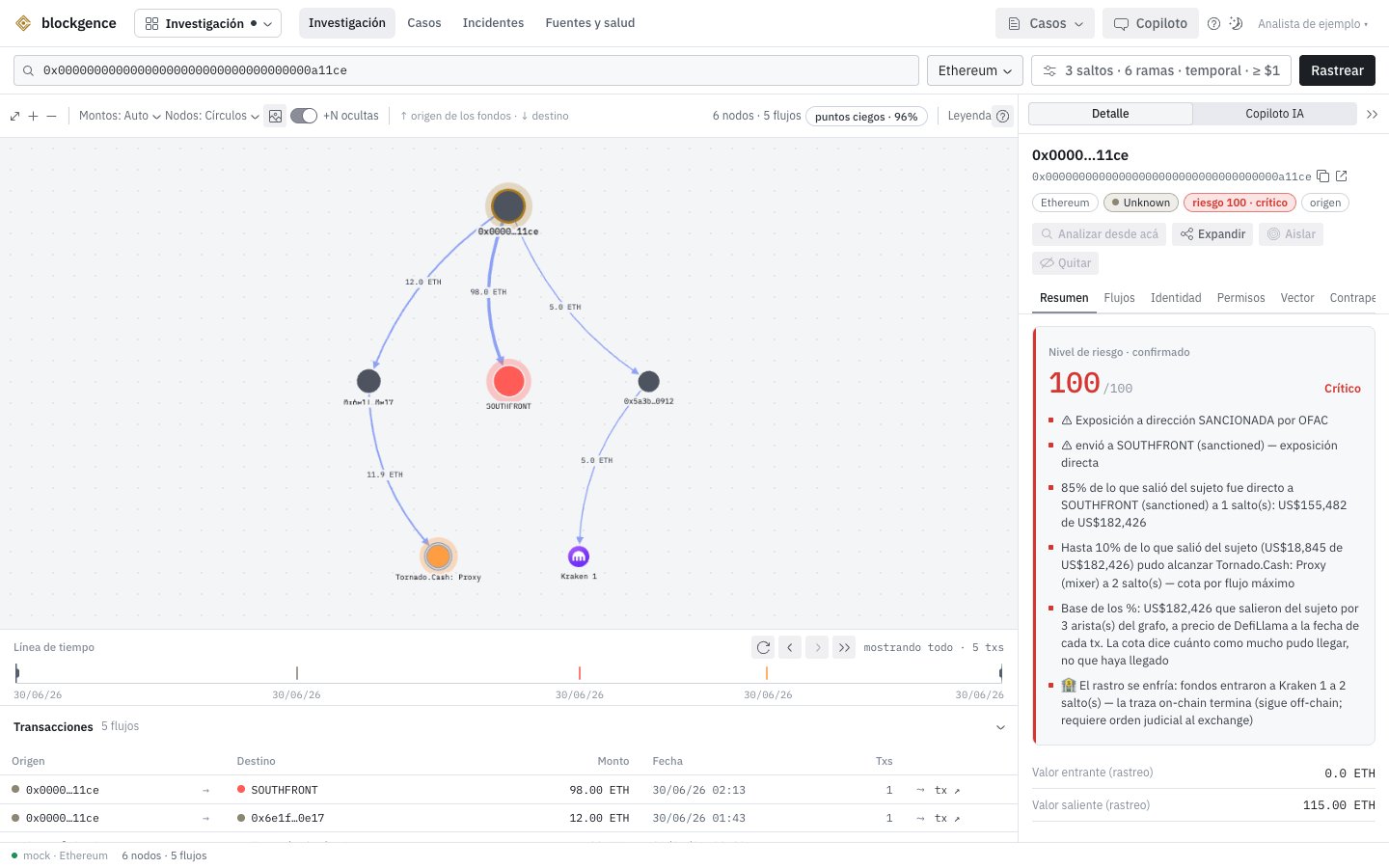
The tracing canvas with demo data.
Networks
Blockgence traces Ethereum, BSC, Polygon, Arbitrum, Base, Optimism and Tron. Other networks (Bitcoin, Solana and others) only appear as the destination of a cross-chain transfer, with the address on the other side.Trace an address
1
Pick the address and the network
Paste the address in the search field (the / key takes you there) and pick the network. Only networks that
can be queried are listed.
2
Adjust the parameters
In Parámetros (parameters) you choose the forward hops (1 to 20), the branches per node (1 to 60), whether tokens are included,
whether the flow follows time order, a date window and the dust threshold in USD. Backward tracing covers 2 hops.
3
Trace
While tracing, a probe runs on the other networks (if the address has no activity on the chosen network, it tells you
where it does) and ENS names are resolved.
4
Read the notice strip
The tracing notices appear above the canvas: partial coverage (which source failed and where), activity on other
networks and, when it applies, the trail from a loss transaction or the stages of an attack. Notices push the graph
down: they never cover the data.
Read the graph
- Nodes. Color is the category (sanctioned, mixer, scam, exchange, bridge, victim, contract, unknown and others), shape separates contracts from wallets, and size is value. The origin is highlighted.
- Edges. Color is the asset. Cross-chain transfers are blue (dashed when heuristic), swaps are teal and bridge refunds are orange. An edge with a mark (unverified, unknown decimals, refund) never loses its label.
- Interaction. A click opens the node detail and highlights the path from the origin. A double click expands one more hop. The +N hexagons reveal the counterparties the trace left out, 20 at a time.
- Timeline and table. Below the canvas, the timeline filters the graph by date and the table lists every flow, with its transactions, cross-chain transfers and swaps expandable. A click on an edge takes you to its row and back.
Risk separates what is deterministic (proven by on-chain data or a cryptographic id) from what is
probabilistic (an inference with its confidence). Confirmed risk excludes the probabilistic part.
Cases
A case saves the whole investigation: the starting address, the parameters, the graph with its expansions, the time filter, the coverage and the verdicts.1
Create the case
From the top bar. From then on it saves itself, a second and a half after each change.
2
Open it again
A case opens exactly as you left it, without querying the chain again.
3
Share it
From Casos (cases), with people in your organization, to view or to edit. When you open it, Blockgence tells you if its
addresses are already in other cases you can see.
4
Export the evidence
The evidence package is a sealed JSON with its sha256 and the Blockgence signature (an unsigned document says so),
and it can come with a PDF report. How to check it, in Methodology and evidence.
Incidents
Paste what you have and say what it is. Blockgence shows the matching views:
Modo incidente (incident mode) follows a playbook for the first hours: you paste the hash, the victim or the attacker’s addresses,
set a credit cap and follow each step live, with what it charged. At the end it opens the case or the post-mortem.
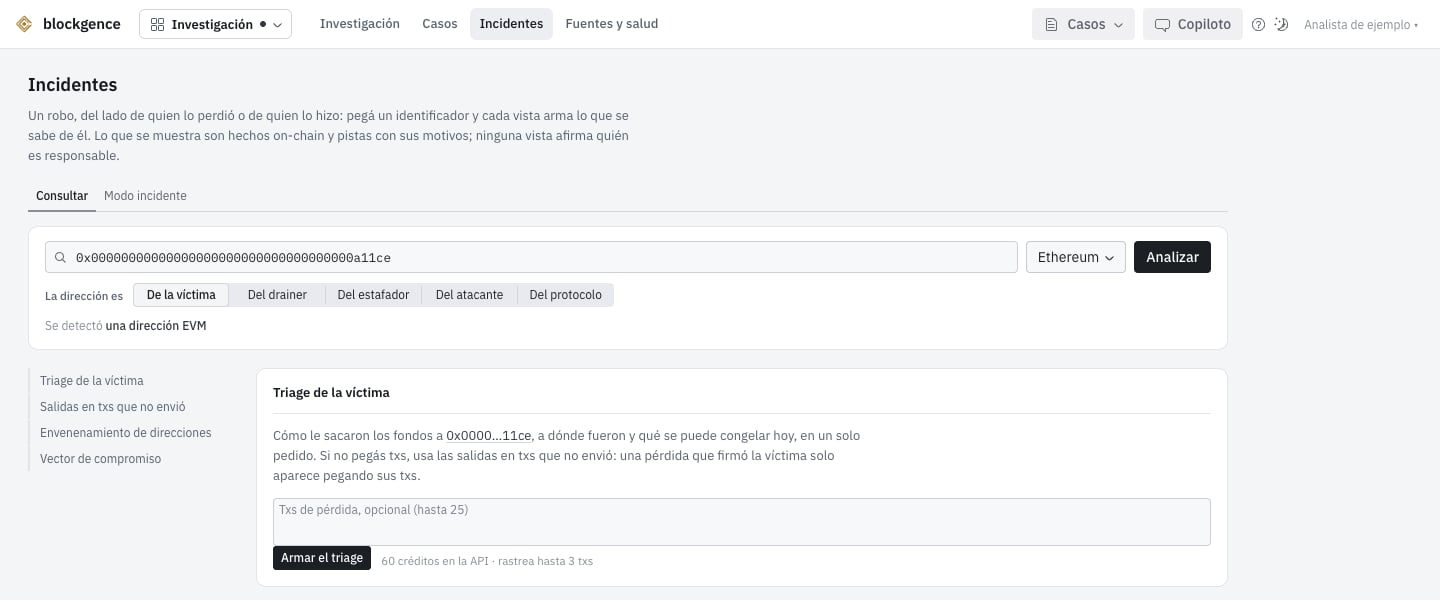
Incidents: an address analyzed as a victim, with demo data.
Sources and health
One card per data source: whether it is configured, its status, its license and its last error. Below, a matrix shows what can be queried on each network. Use it to understand a partial-coverage notice before drawing a conclusion.Through the API
Everything in Investigation is in the API: tracing (POST /v1/trace), the address profile, funding, counterparties,
cross-chain transfers, swaps, cases (/v1/cases) and evidence. Each query can be tied to a case with the X-Case-Id
header.
nodes and edges) with the label, category and explained risk of each node, and the
exchanges reached in offramps. Whatever could not be read travels in the same response. Details in the
API reference.
What it does not cover
- The graph is a sample, bounded by hops, branches, dust and row caps. It is not the full history, and what is left out is declared.
- Shared infrastructure (routers, pools, vaults) cuts the trail on purpose: what comes out of it belongs to other users.
- A bridge that is not among the reconstructed ones is named but not crossed. A transfer to a network that is not queried is declared.
- Mixer demixing covers only Tornado Cash on Ethereum, and it gives leads, not proof.
- NFTs are not traced (they show up in approvals and in the compromise vector), and tokens without a published price are filtered out of the trace as spam, declared.
- Attribution comes from public sources, verified registries and your organization’s labels. It is not a proprietary entity database at scale.
- Exploit heuristics do not cover business-logic bugs, external oracles, governance or compromised keys. Most heuristics declare that their error rate is not measured.
- Monero is not traced: the network does not publish senders, recipients or amounts. Only screening and the payment proof are available.